> For the complete documentation index, see [llms.txt](https://support.datech.ai/llms.txt). Markdown versions of documentation pages are available by appending `.md` to page URLs; this page is available as [Markdown](https://support.datech.ai/influx/outreach/mass-message-tiktok-creators-via-dm.md).
# How to Mass Message TikTok Creators via DM?
Still sending DMs to creators one by one? Influx DM outreach, powered by TikTok's official API and our proprietary cloud system, **reaches 10,000+ creators in just 3 minutes—boosting efficiency by 300%!**
TikTok US Creator Targeted Invitation New Rules Update:
The maximum number of daily targeted bulk invitations is now determined by store GMV. Previously, both local and cross-border stores had a daily cap of 10,000 invitations. Under the new rules, the limit is based on the store's GMV over the past 30 days.
* Currently fully effective for cross-border stores
* Rolling out for local stores
* Under $2K GMV: 2,000 creators/**week** (creators ≤20K followers)
* 2K−50K GMV: 7,000 creators/**week**
* Over $50K GMV: **No limit**
## 📝Step-by-Step Guide
{% stepper %}
{% step %}
### **Navigate to Your Campaign**
Go to **Campaign > Campaign Management** and select the campaign you want to use for influencer outreach.
{% endstep %}
{% step %}
### Filter Your Target TikTok Creators
Use the filters Status (Campaign Status), Contact Status, and **Tag** to narrow down the influencers you wish to invite via DM.
Select them and click "Direct Message" to open the DM editor.
{% hint style="warning" %}
**Tips:**
Click **"Direct message all"** to instantly select all creators in your campaign!
{% endhint %}
{% endstep %}
{% step %}
**DM Editor Fields**
{% hint style="success" %}
#### How to Use the DM Editor?
* **Shop** – Choose the store you want to send the DM from.
*Note: Ensure the store’s region matches the TikTok influencer’s region; otherwise, ineligible influencers will be filtered out.*
* **Message Type** – Choose between **text-only messages** or **product card messages**.
* **Recipients** – The influencers you selected before opening the DM editor will be pre-selected. Click the "**+**" button to add or remove recipients.
*Note: Some influencers may not be eligible due to region restrictions or missing storefronts.*
* **Body** – Write the message content.
* **Product Card** – Select a product from the dropdown list, which automatically pulls items from your selected store.
* **Filter Influencers** – Exclude certain influencers from receiving messages by setting these conditions:
* Exclude influencers who have received **X number of DMs** (range: 1-5).
* Exclude influencers who received a DM **within the last X days** (range: 1-7).
*Note: Both conditions work as an intersection, meaning only creators meeting both criteria will be filtered out.*
* **Preview** – View the message in the right panel before sending.
{% endhint %}
{% endstep %}
{% step %}
### Send DM Messages
Click "Send" to dispatch the DM. The message will sync automatically to the TikTok Shop seller center.
{% endstep %}
{% step %}
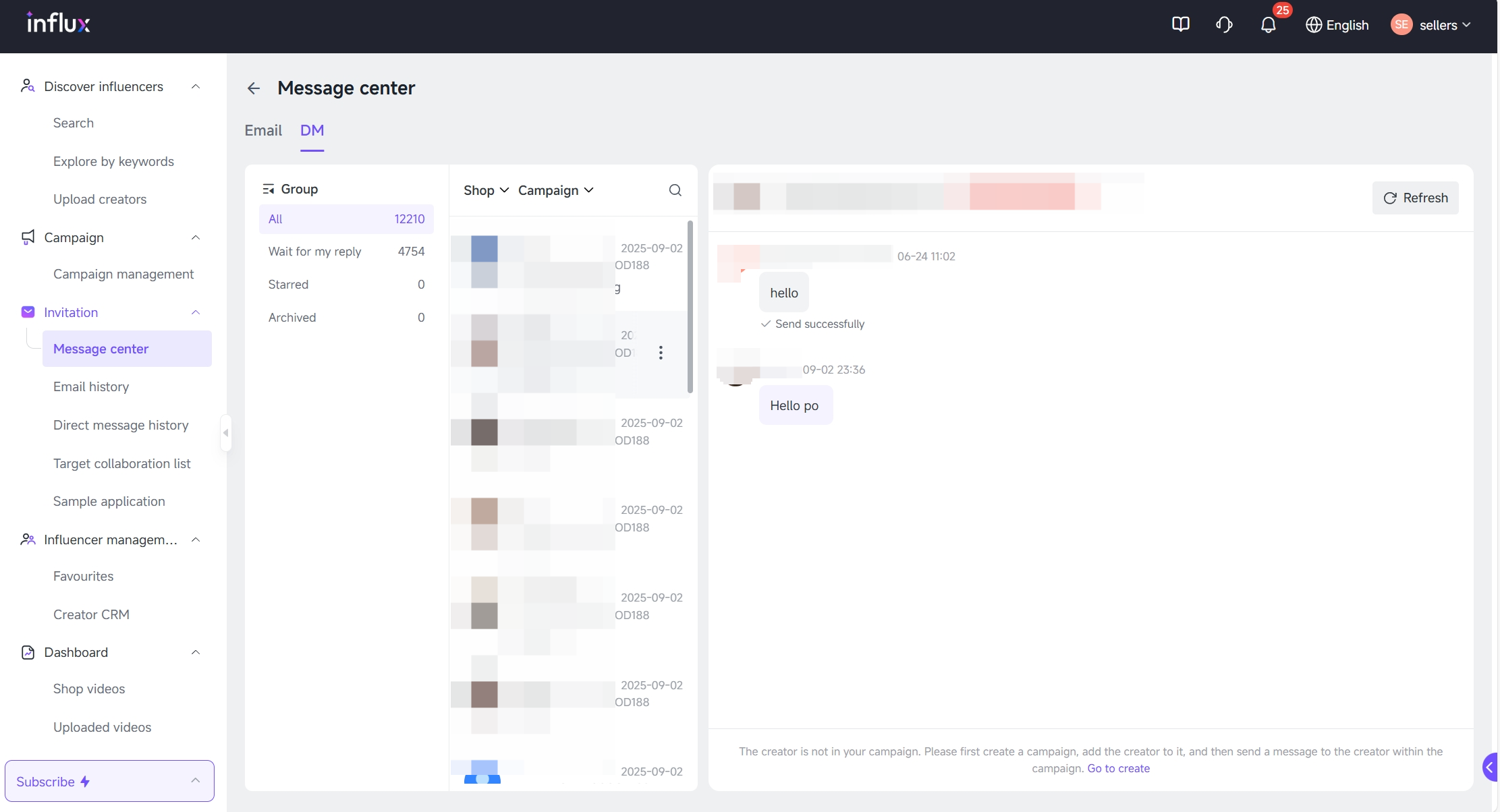
### **Track DM Messages**
Go to the **Message Center > DM > Send History** to track your sent messages. Replies from influencers will appear here as well, syncing with TikTok Shop’s seller center.
{% hint style="info" %}
**Click to Learn More**
1. **Quick-Replies Function**
Use the **Commonly used words** function to add preset common phrases to your messages with one click, ensuring efficient and simple communication with creators.
{% endhint %}
{% endstep %}
{% step %}
### **Reply to Creator DMs in Message Center**
Use **Message Center** to continue conversations and negotiate collaborations.
{% endstep %}
{% endstepper %}
### 🎊You did it!
Using Influx's bulk DM outreach moves influencer marketing into a new era of automation and high response rates!
#### Need Help?
| | [WhatsApp](https://wa.me/message/WIQCGJNSFBBUK1) |
| -------------------------------------------------------------------------------------------------------------------------------------------------------------------------------------------------------------------------------------------------------------------------------- | ------------------------------------------------------------------------------------------------------------------------------------------------------------------------------------------------------------------------------------------------------------------------------------------------------ |


 {% endhint %}
{% endstep %}
{% step %}
### **Reply to Creator DMs in Message Center**
Use **Message Center** to continue conversations and negotiate collaborations.
{% endhint %}
{% endstep %}
{% step %}
### **Reply to Creator DMs in Message Center**
Use **Message Center** to continue conversations and negotiate collaborations.

 [WhatsApp](https://wa.me/message/WIQCGJNSFBBUK1) |
| -------------------------------------------------------------------------------------------------------------------------------------------------------------------------------------------------------------------------------------------------------------------------------- | ------------------------------------------------------------------------------------------------------------------------------------------------------------------------------------------------------------------------------------------------------------------------------------------------------ |
[WhatsApp](https://wa.me/message/WIQCGJNSFBBUK1) |
| -------------------------------------------------------------------------------------------------------------------------------------------------------------------------------------------------------------------------------------------------------------------------------- | ------------------------------------------------------------------------------------------------------------------------------------------------------------------------------------------------------------------------------------------------------------------------------------------------------ |