> For the complete documentation index, see [llms.txt](https://support.datech.ai/llms.txt). Markdown versions of documentation pages are available by appending `.md` to page URLs; this page is available as [Markdown](https://support.datech.ai/influx/whats-new/v02.md).
# V02 | Major Upgrades to the Target Collaboration
To help you run TikTok Shop affiliate campaigns more efficiently, Influx has rolled out a series of powerful updates to the **Targeted Collaboration** and **Shop Management** modules. These enhancements are designed to give you more control over invite strategies, and better visibility into store data.
## **✨ Here’s What’s New:**
### 🎯 Targeted **Collaboration** Upgrades
> We’ve made major improvements to the Targeted Collaboration to help you customize and fine-tune your campaign offers with greater flexibility:
{% stepper %}
{% step %}
#### **Search Products by Product ID or Name**
You can now quickly locate products to promote using either the product ID or product name within your campaign setup.
{% endstep %}
{% step %}
#### **Full Product Price Display**
Each product's full pricing information is now clearly shown, making it easier to assess costs and plan your budget before sending invites.
{% endstep %}
{% step %}
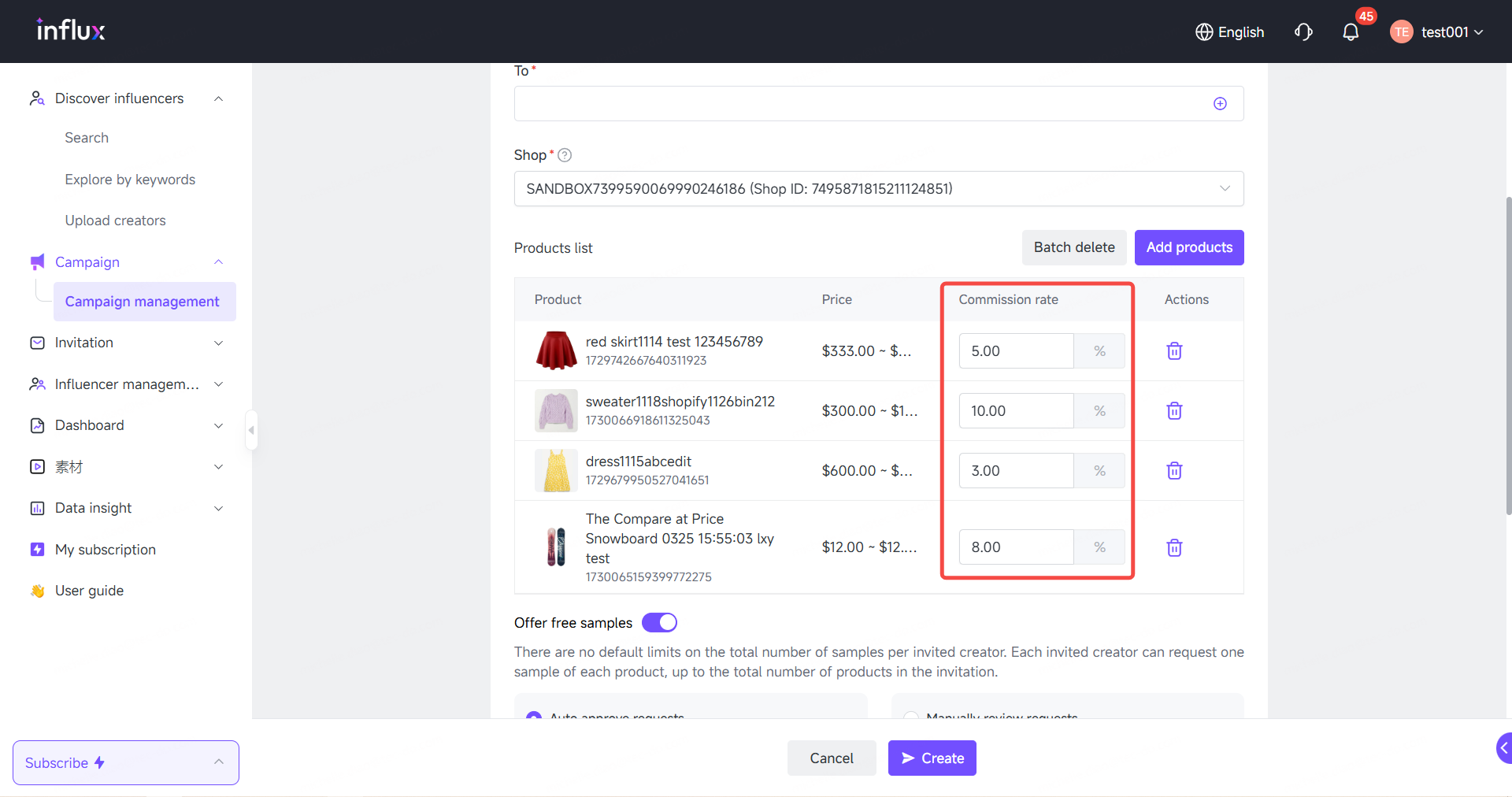
#### **Add Multiple Products to a Targeted Collaboration Plan**
No more one-by-one invites. You can now select multiple products in a single target collaboration plan and assign custom commission rates for each — giving you more control over incentive strategies.
{% endstep %}
{% step %}
#### **Expanded Commission Range: 1%–80%**
Set commission rates anywhere between 1% and 80% based on your product goals or creator tiers. More flexibility means more ways to win.
{% endstep %}
{% endstepper %}
### **🌍 Store Region is Visible**
We’ve added region display to the Authorized Store List. Whether you’re managing local or cross-border stores, you can now quickly identify store locations and adapt your strategy to different markets with ease.
### **💬 Message Center Upgrades**
{% stepper %}
{% step %}
#### **Filter Conversations by Store Region**
Want to view conversations with creators from a specific region? You can now filter your inbox by store location, so your communications stay focused and well-organized.
{% endstep %}
{% endstepper %}
👉 [Log in to Influx dashboard](https://kol.datech.ai/login) and explore all the latest features.
Have feedback or suggestions? We’re always happy to hear from you!
#### **Need Help?**
| | [WhatsApp](https://wa.me/message/WIQCGJNSFBBUK1) |
| -------------------------------------------------------------------------------------------------------------------------------------------------------------------------------------------------------------------------------------------------------------------------------- | ------------------------------------------------------------------------------------------------------------------------------------------------------------------------------------------------------------------------------------------------------------------------------------------------------ |




 [WhatsApp](https://wa.me/message/WIQCGJNSFBBUK1) |
| -------------------------------------------------------------------------------------------------------------------------------------------------------------------------------------------------------------------------------------------------------------------------------- | ------------------------------------------------------------------------------------------------------------------------------------------------------------------------------------------------------------------------------------------------------------------------------------------------------ |
[WhatsApp](https://wa.me/message/WIQCGJNSFBBUK1) |
| -------------------------------------------------------------------------------------------------------------------------------------------------------------------------------------------------------------------------------------------------------------------------------- | ------------------------------------------------------------------------------------------------------------------------------------------------------------------------------------------------------------------------------------------------------------------------------------------------------ |