> For the complete documentation index, see [llms.txt](https://support.datech.ai/llms.txt). Markdown versions of documentation pages are available by appending `.md` to page URLs; this page is available as [Markdown](https://support.datech.ai/influx/whats-new/v01.md).
# V01 | Major Upgrades to the Message Center
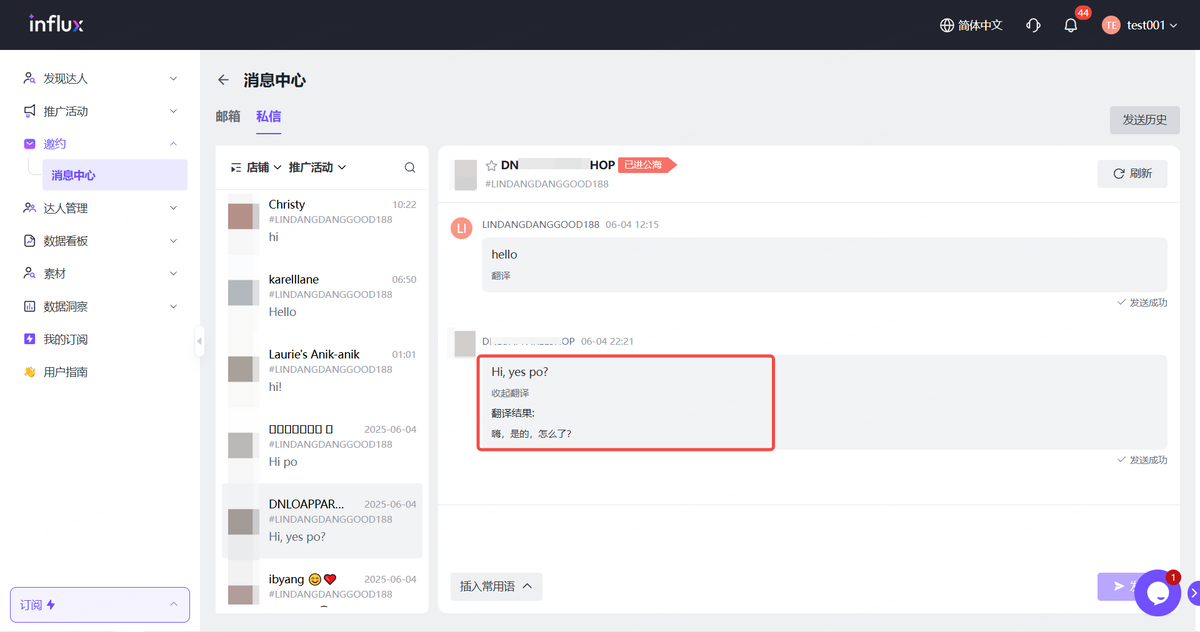
To help you collaborate with TikTok creators more efficiently, Influx has rolled out a series of powerful new updates to the **Message Center**. These upgrades are designed to improve multi-campaign communication, streamline message management, and make global collaboration even smoother.
## **✨ Here’s What’s New:**
{% stepper %}
{% step %}
### **Filter Conversations by Campaign**
You can now filter all conversations within a specific campaign directly in the Message Center. Whether you're managing one campaign or many, it’s now easier than ever to stay focused and organized.
{% endstep %}
{% step %}
### **Campaign Names Displayed Under Each Creator**
No more second-guessing which campaign a creator belongs to. **In the Email List**, every creator’s name in the Message Center now includes their associated campaign beneath it — so you can identify and manage conversations at a glance.
{% endstep %}
{% step %}
### **Export Emails as PDF**
Need to save or share important communication? You can now export any individual email as a PDF with just one click. Perfect for record-keeping, internal reviews, or aligning with partners.
{% endstep %}
{% step %}
### **One-Click Message Translation to Chinese**
Language barriers? Not anymore. **When your system language is set to Chinese**, you can instantly translate any message to Chinese with one click — making global collaboration seamless.
{% endstep %}
{% step %}
### **Insert Common Phrases with a Click**
Replying just got faster. Add preset common phrases to your messages with a single click to ensure consistent, professional communication across your entire team.
{% endstep %}
{% endstepper %}
👉 [Log in to your Influx dashboard](https://kol.datech.ai/login) and head to the **Message Center** to experience the latest updates.
Got feedback or questions? We’d love to hear from you!
#### **Need Help?**
| | [WhatsApp](https://wa.me/message/WIQCGJNSFBBUK1) |
| -------------------------------------------------------------------------------------------------------------------------------------------------------------------------------------------------------------------------------------------------------------------------------- | ------------------------------------------------------------------------------------------------------------------------------------------------------------------------------------------------------------------------------------------------------------------------------------------------------ |




 [WhatsApp](https://wa.me/message/WIQCGJNSFBBUK1) |
| -------------------------------------------------------------------------------------------------------------------------------------------------------------------------------------------------------------------------------------------------------------------------------- | ------------------------------------------------------------------------------------------------------------------------------------------------------------------------------------------------------------------------------------------------------------------------------------------------------ |
[WhatsApp](https://wa.me/message/WIQCGJNSFBBUK1) |
| -------------------------------------------------------------------------------------------------------------------------------------------------------------------------------------------------------------------------------------------------------------------------------- | ------------------------------------------------------------------------------------------------------------------------------------------------------------------------------------------------------------------------------------------------------------------------------------------------------ |