> For the complete documentation index, see [llms.txt](https://support.datech.ai/llms.txt). Markdown versions of documentation pages are available by appending `.md` to page URLs; this page is available as [Markdown](https://support.datech.ai/influx-zh/outreach/mass-message-tiktok-creators-via-target-invites.md).
# 如何通过定向邀约批量建联达人?
Influx 批量定向邀约计划,为您构建高效达人邀约方案,**3分钟内极速触达上万达人**!**依托独家TikTok官方接口,发信安全稳定,有效提高合作成功率至90%!**
TikTok美区达人私信邀约人数新规:
根据GMV决定店铺邀约人数上限,之前不管是本土店还是跨境店店,每天批量私信邀约上限1w个,新规生效后,根据店铺过去30天GMV决定上限数量。目前跨境店全部生效,本土店陆续生效中。
**新规详情:**
1. GMV 2千美金内,每周上限2000个,且达人粉丝数不超过2w;
2. GMV 2千-5万美金,每周上限7000个;
3. GMV 5万美金以上,没有上限。

## 📝**图文教程详解**
{% stepper %}
{% step %}
### **进入推广活动管理页面**
在Influx后台,导航到**推广活动 > 推广活动管理**,选择您要管理的活动。
 {% endstep %}
{% step %}
### **筛选达人**
使用活动状态、建联状态和标签来筛选出你想通过定向邀约建联的达人。
勾选合适的达人后,点击“**定向邀约计划**”按钮,进入邀约编辑页面。
{% endstep %}
{% step %}
### **筛选达人**
使用活动状态、建联状态和标签来筛选出你想通过定向邀约建联的达人。
勾选合适的达人后,点击“**定向邀约计划**”按钮,进入邀约编辑页面。
 {% hint style="warning" %}
#### **温馨提示:**
直接点击“全部定向邀约”即可一键全选推广活动里的所有达人!
{% endhint %}
{% endstep %}
{% step %}
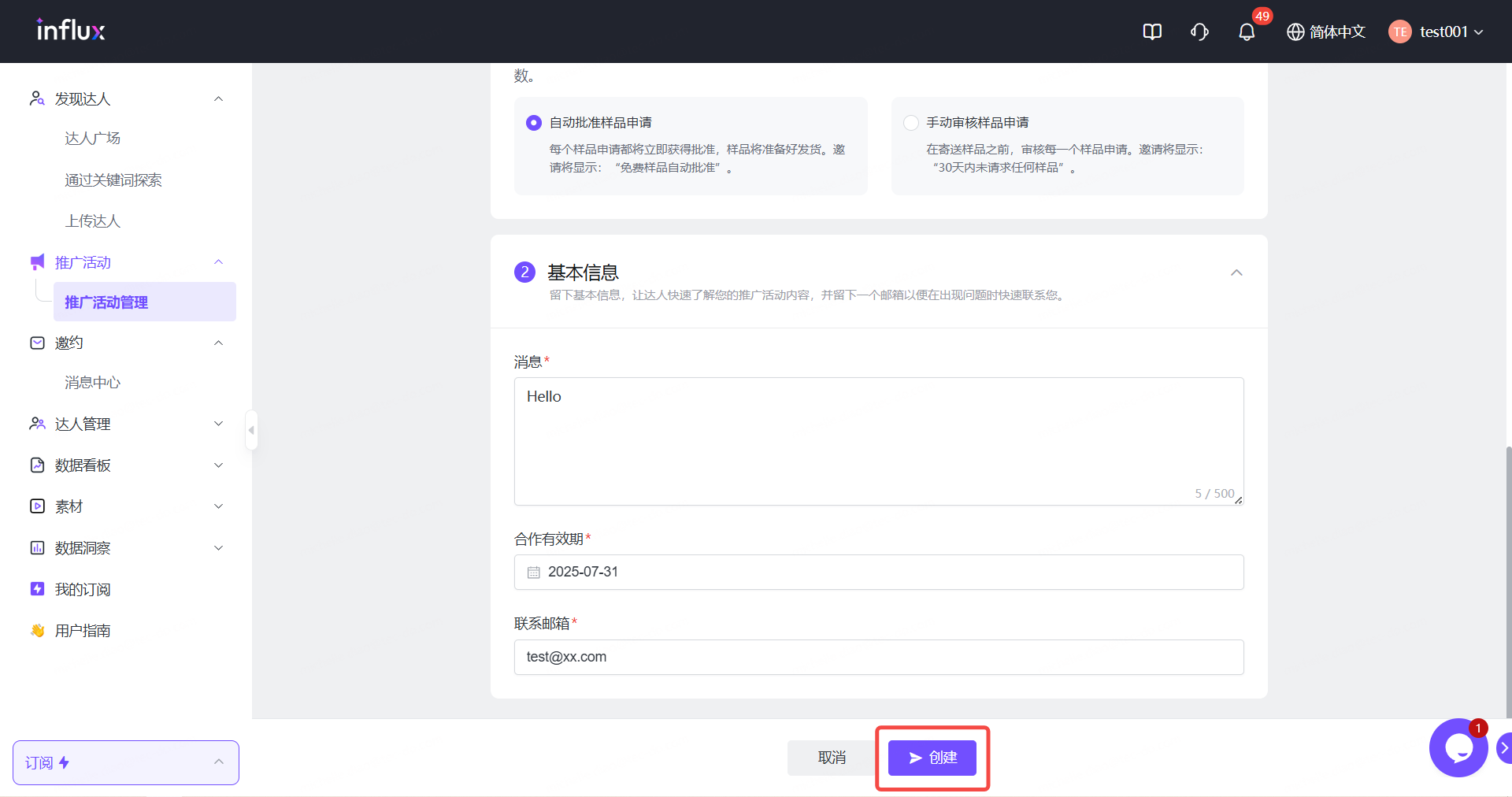
### **填写定向邀约内容**
> 字段与 TikTok Shop 卖家中心中的字段相同。
在定向邀约编辑界面中,按照如下步骤填写:
{% hint style="success" %}
#### 如何使用定向邀约?
* **定向邀约名称** – 使用你的推广活动名称或自定义名称。(最多 25 个字符)。
* **店铺** – 选择店铺
*注意:确保店铺与达人地区匹配。*
* **商品列表** – 选择您希望达人推广的产品(支持多个产品)。下拉菜单将自动加载你所选商店的产品。你可以通过商品名称和ID检索产品。
* **佣金率** – 为不同的产品设置不同的佣金比例。
* **提供免费样品** – 选择是否提供免费样品。如果启用,请决定是**自动批准还是手动审核**样品申请。
* **消息** – 填写发送给达人的活动介绍信息。
* **合作有效期** – 选择邀约计划的结束日期。
* **联系邮箱** – 填写你的联系邮箱。
{% endhint %}
{% hint style="warning" %}
#### **为什么不能设置广告佣金:**
由于广告佣金为TikTok新增加功能,还未开放广告佣金的接口,所以暂时不能一键设置广告佣金,需要您回到TikTok Shop手动设置。待广告佣金接口开放,我们将会立刻在Influx上线。
{% endhint %}
{% endstep %}
{% step %}
### **发送定向邀约**
点击“**创建**”即可发送定向邀约计划。
{% hint style="warning" %}
#### **温馨提示:**
直接点击“全部定向邀约”即可一键全选推广活动里的所有达人!
{% endhint %}
{% endstep %}
{% step %}
### **填写定向邀约内容**
> 字段与 TikTok Shop 卖家中心中的字段相同。
在定向邀约编辑界面中,按照如下步骤填写:
{% hint style="success" %}
#### 如何使用定向邀约?
* **定向邀约名称** – 使用你的推广活动名称或自定义名称。(最多 25 个字符)。
* **店铺** – 选择店铺
*注意:确保店铺与达人地区匹配。*
* **商品列表** – 选择您希望达人推广的产品(支持多个产品)。下拉菜单将自动加载你所选商店的产品。你可以通过商品名称和ID检索产品。
* **佣金率** – 为不同的产品设置不同的佣金比例。
* **提供免费样品** – 选择是否提供免费样品。如果启用,请决定是**自动批准还是手动审核**样品申请。
* **消息** – 填写发送给达人的活动介绍信息。
* **合作有效期** – 选择邀约计划的结束日期。
* **联系邮箱** – 填写你的联系邮箱。
{% endhint %}
{% hint style="warning" %}
#### **为什么不能设置广告佣金:**
由于广告佣金为TikTok新增加功能,还未开放广告佣金的接口,所以暂时不能一键设置广告佣金,需要您回到TikTok Shop手动设置。待广告佣金接口开放,我们将会立刻在Influx上线。
{% endhint %}
{% endstep %}
{% step %}
### **发送定向邀约**
点击“**创建**”即可发送定向邀约计划。
 {% endstep %}
{% step %}
### **查看历史发信记录**
前往**邀约 > 定向列表**,在这里可以追踪你发送过的历史定向邀约计划。
所有定向邀约计划的发送记录将与TikTok Shop商家后台同步,方便进一步沟通。
在这里你可以**一键批量删除**已经结束的或者没有达人回复的定向邀约计划,以释放更多定向邀约额度!
{% endstep %}
{% step %}
### **查看历史发信记录**
前往**邀约 > 定向列表**,在这里可以追踪你发送过的历史定向邀约计划。
所有定向邀约计划的发送记录将与TikTok Shop商家后台同步,方便进一步沟通。
在这里你可以**一键批量删除**已经结束的或者没有达人回复的定向邀约计划,以释放更多定向邀约额度!
 {% hint style="info" %}
通过 Influx 发送的定向邀约将同步到**TikTok Shop 的联盟中心**,你也可以在那里查看。
**点击查看更多:**[0702 | 定向邀约计划同步管理](/influx-zh/whats-new/v04.md)
{% endhint %}
{% endstep %}
{% step %}
### **在消息中心回复达人的私信**
在**消息中心**继续跟达人沟通并协商合作。
{% hint style="info" %}
通过 Influx 发送的定向邀约将同步到**TikTok Shop 的联盟中心**,你也可以在那里查看。
**点击查看更多:**[0702 | 定向邀约计划同步管理](/influx-zh/whats-new/v04.md)
{% endhint %}
{% endstep %}
{% step %}
### **在消息中心回复达人的私信**
在**消息中心**继续跟达人沟通并协商合作。
 {% endstep %}
{% endstepper %}
## 🎊**你成功做到了!**
现在使用Influx开启**批量定邀建联**,推动达人营销走向**智能化、标准化、高响应**!
#### **需要帮助?**
|
{% endstep %}
{% endstepper %}
## 🎊**你成功做到了!**
现在使用Influx开启**批量定邀建联**,推动达人营销走向**智能化、标准化、高响应**!
#### **需要帮助?**
|  |
|  [WhatsApp](https://wa.me/message/WIQCGJNSFBBUK1) |
| ------------------------------------------------------------------------------------------------------------------------------------------------------ | ----------------------------------------------------------------------------------------------------------------------------------------------------------------------------------- |
[WhatsApp](https://wa.me/message/WIQCGJNSFBBUK1) |
| ------------------------------------------------------------------------------------------------------------------------------------------------------ | ----------------------------------------------------------------------------------------------------------------------------------------------------------------------------------- |